Fishing Points - Fishing App
Fishing Points d.o.o.Sports
4.42.84K Reviews
- Version
- 4.7.1
- Installs
- 10.00M
- Age Rating
- Everyone
Screenshots
Our Review of Fishing Points - Fishing App
 Analysis by Appyee
When I plan a fishing trip, I want quick answers to practical questions: is the weather worth the drive, what conditions might I find at the water, and how will I remember a spot that worked? Fishing Points brings several of those planning tools together, which is useful when I would rather spend my time preparing tackle than switching between separate forecast and mapping apps.
Fast planning, with forecasts in context
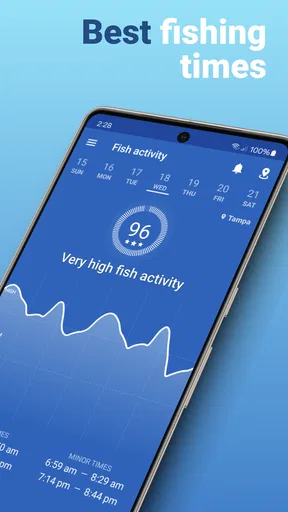
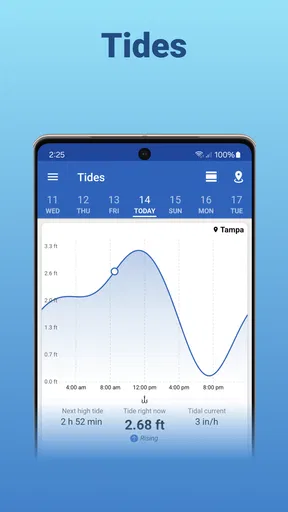
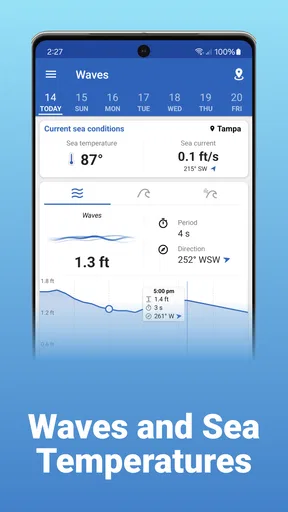
The main appeal for me is having fishing forecasts alongside weather, wind and tide information. Those details help me think through when a trip might be worthwhile, but I treat them as guidance rather than a promise of a bite. Local conditions can change, and a forecast cannot account for every bank, current, or change in how fish behave. I still use my own judgement and check conditions again before setting off.
That distinction matters most when a short window is all I have. If I can fish for only a couple of hours, I can use the forecast to compare possible times and decide whether the outing makes sense. For a longer trip, I find the information more useful as a planning aid than as a reason to build the whole day around one predicted peak.
When several tools come into play
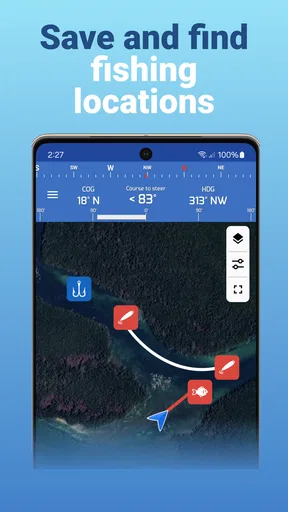
A typical outing involves more than checking the forecast. I might look at conditions at home, save a promising location, then use the map to return to it later. On the water, saved spots and GPS can help me distinguish a familiar access point from a nearby place I have not explored. The practical advantage is continuity: a useful location does not have to remain an indistinct memory or a pin in a separate mapping app.
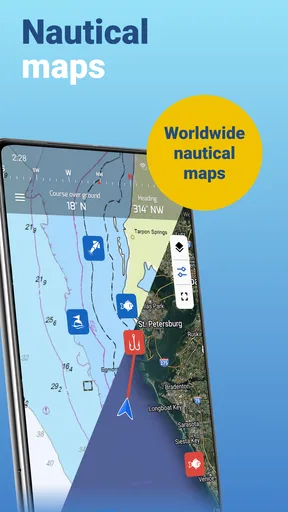
Offline maps are especially relevant if I expect patchy mobile reception. I would prepare before leaving coverage rather than assume every map detail will appear after the signal drops. That small habit makes the feature more dependable: check the area while connected, then use the saved map as a backup. It is still sensible to carry a paper map or know the route if the trip depends on navigating unfamiliar terrain.
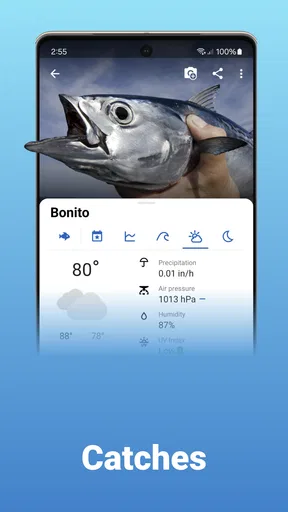
The logbook adds value after the fishing itself. A catch entry with a photo and notes can help me remember what I was doing, instead of relying on a vague recollection weeks later. I would keep notes specific but quick: location, conditions, and a detail about the approach. That gives future entries a useful comparison without turning a relaxed trip into a paperwork exercise.
Who will get the most from it
I see this as a good fit for anglers who revisit locations, plan around changing weather or tides, and want their saved spots and catch notes in one place. It can also suit a newcomer who wants help organizing outings without first building a collection of separate tools. The app is from Fishing Points d.o.o.; it has been available since June 20, 2013, and its current version is 4.5.8.
Someone who only fishes occasionally at a familiar pond may not need a dedicated planning app. A basic weather forecast and a location already known by heart could be enough. Likewise, if you prefer paper notes or do not want to record catches digitally, the logbook may not change your routine. I would not choose this app as a substitute for local fishing knowledge, safe navigation, or checking rules that apply to a particular waterway.
What to expect from speed and stability
In my experience, the interface is straightforward, and the usual planning tasks feel easy to approach. The earlier version of this review described loading as quick and noted no glitches during that use, though performance can vary with a device, network, and the amount of map information being handled. A forecast or map that depends on connectivity may feel less immediate in a weak-signal area, so I would prepare the route and map before travelling rather than judge the app only from a remote shoreline.
Heavier use is likely to mean moving between the map, forecasts and saved information during a trip. That is where keeping the map ready and recording only useful notes can make the experience feel less fiddly. If the phone is older or already low on battery, GPS use and screen time are worth considering as part of the outing; I would bring a power bank for a long day rather than expect any fishing app to remove that constraint.
Discovering Fishing Points
When I first stumbled upon Fishing Points, I was curious if it could really enhance my fishing adventures. The app promises to be a comprehensive tool for anglers, offering everything from fishing forecasts to a personal logbook. After downloading it, I was eager to see how it lived up to its claims.
Features That Hooked Me
One of the standout features for me is the fishing forecast. It provides detailed information on weather, wind, and tides, all crucial for planning a successful trip. I’ve found that knowing the ideal conditions helps tremendously in choosing the right day and time to fish.
Another aspect I love is the GPS feature. It allows you to mark your favorite fishing spots, which is a game-changer. I can easily navigate back to the same spot where I caught a big one or discovered a hidden gem. Plus, the offline maps mean I’m never lost, even when my phone loses signal.
The logbook is something I didn’t know I needed until I started using it. Being able to record my catches, along with photos and notes, helps me track my progress and refine my techniques. It’s like having a personal fishing diary right in my pocket.
Usability and Experience
In terms of usability, the app is pretty intuitive. Even if you’re not tech-savvy, you’ll find it easy to navigate. The interface is clean, and everything is where you’d expect it to be. I appreciate the straightforward design because, honestly, I’d rather focus on fishing than figuring out how to use an app.
Loading times are quick, and I haven’t encountered any glitches, which is a relief. The last thing you want is to be frustrated with technology when you’re trying to relax.
Why You Should Give It a Cast
Now, you might be wondering if it’s worth the download. In my opinion, Fishing Points is a valuable tool for anyone who enjoys fishing, whether you’re a seasoned pro or a weekend enthusiast. The convenience of having all these features in one place outweighs any minor drawbacks.
It’s also worth mentioning that the app is free, with optional in-app purchases ranging from $0.99 to $49.99 per item. This means you can try it out without any commitment. If you find yourself using it as much as I do, there are premium features available that unlock even more potential. It is rated for Everyone, and its 4.4 average across around 200,000 ratings, with over 5 million installs, suggests that many anglers have tried it.
Choosing it over separate alternatives
Compared with using a general weather app, a mapping tool and a notebook separately, this fishing app’s advantage is keeping forecasts, marked places and catch records within one fishing-focused workflow. That convenience is real, but it does not mean it replaces every specialist alternative. If I only need a broad weather check, a weather app may be quicker. If I need detailed navigation for a remote route, I would use a dedicated navigation resource as well. I see Fishing Points as the organizer for fishing decisions, not a complete replacement for local expertise or safety planning.
One useful habit is to make a location meaningful when saving it. A pin alone may not remind me why I chose that exact stretch of water later. Adding a brief note in the logbook after a visit gives the map context: what made the place worth returning to and what conditions I encountered. I would also avoid treating a productive spot as a guaranteed repeat; returning at a different time or in different weather can produce a very different day.
Cost, compatibility and practical limits
The app is free to download, with optional purchases. I would start with the free experience and decide whether the paid options fit my actual routine, rather than paying simply because I fish often. The current version is 4.5.8, and it requires Android 8.0 or later. Those details matter if you are installing it on an older phone; checking compatibility first is more useful than discovering the limitation on the way to the water.
Its rating is 4.4 from around 200,000 ratings, and it has over 5 million installs. I read that as evidence of a sizeable user base, not a guarantee that every forecast, map or device experience will suit me. The most important test is whether the combination of planning and record-keeping matches how I fish. If all I want is a one-off weather check, the extra tools may be more than I need.
A realistic day on the water
For a weekend session, I would check the forecast before committing to the drive, save the area I intend to visit while connected, and make sure I can identify the route before reception becomes uncertain. Once I arrive, GPS markers can help me keep track of places worth exploring. Afterward, I can add a short catch note and photo, then use that record to make a more informed choice next time. This is a modest routine, but it turns separate moments—planning, finding a place and remembering the outcome—into one usable history.
There are limits to that workflow. Looking at a phone too often can distract from fishing and drain attention, and a saved pin is not a substitute for watching footing, water conditions or weather changes. I prefer to do most planning before I start fishing, then use the phone briefly when I need it. That balance lets the app support the outing without becoming the outing.
My performance verdict
For a fishing-focused app, I find the strongest case for using it is not any single screen but the connection between forecasts, maps and a personal record. The interface has felt approachable in my use, while the app’s usefulness in the field depends partly on preparing for weak reception and managing phone battery sensibly. If you want a simple way to plan trips and build a record of places and catches, I think it is worth trying. If you fish rarely, already have a system you trust, or need specialist navigation, another tool—or no additional app—may be the better choice.
Wrapping Up My Experience
In conclusion, Fishing Points has become an essential part of my fishing gear. It’s like having a fishing buddy who knows all the best spots and gives you a heads-up on the weather. If you’re ready to take your fishing adventures to the next level, I’d say give this app a try. You might just find it’s the catch you’ve been looking for.
Verdict
Strengths of Fishing Points - Fishing App
- Accurate GPS for pinpoint locations.
- Weather forecasts tailored for fishing.
- Tide charts enhance fishing strategy.
- Catch log keeps detailed records.
- Offline maps for remote areas.
Limitations of Fishing Points - Fishing App
- Some features require in-app purchases.
- Battery drain with continuous GPS use.
- Limited social features for sharing.
- User interface can be overwhelming.
- Occasional bugs with map updates.
Similar Picks in This Category
View All
BeSoccer: Soccer Live Score
BeSoccer apps4.3

Cricbuzz - Live Cricket Scores
Cricbuzz.com3.7

NFL
NFL Enterprises LLC2.4

Da Fit
MO YOUNG LIMITED3.6

ESPN
Disney4.5

LiveScore: Live Sports Scores
LiveScore Limited4.5
Frequently Asked Questions
What features does Fishing Points offer to enhance my fishing experience?
Fishing Points provides a range of features designed to enhance your fishing experience. It includes GPS navigation to your favorite fishing spots, weather forecasts, tide tables, solunar data, and a personal logbook to record your catches. These tools help you plan your fishing trips more effectively and increase your chances of a successful outing.
Is Fishing Points available for both Android and iOS devices?
Yes, Fishing Points is available for download on both Android and iOS platforms. You can find it on the Google Play Store for Android devices and the Apple App Store for iOS devices, ensuring compatibility with a wide range of smartphones and tablets.
Does Fishing Points require an internet connection to function?
Fishing Points can be used both online and offline. While some features like real-time weather updates require an internet connection, the app allows you to download maps and fishing spots for offline use. This ensures that you can access essential tools even when you're out of network coverage areas.
Is there a premium version of Fishing Points, and what additional benefits does it offer?
Yes, Fishing Points offers a premium version that provides additional benefits such as ad-free usage, advanced weather forecasts, extended solunar data, and unlimited waypoints. This upgrade is ideal for serious anglers looking to maximize their fishing efficiency and experience more comprehensive insights.
How user-friendly is Fishing Points for beginners?
Fishing Points is designed with user-friendliness in mind, making it accessible for both beginners and experienced anglers. The app features an intuitive interface with easy-to-navigate menus and clear instructions. Beginners will find it easy to set up their profiles, access fishing spots, and utilize the various tools available.
